
Introducing Kodez CheckMate: AI-Powered SecOps Orchestration for Auth0
Security operations teams face a familiar problem. Vulnerability scanners surface findings. Those findings get copied into spreadsheets, pasted into tickets, summarised in emails, and posted in Slack channels — by hand, one step at a time. The tools exist, but the glue between them does not. Teams end up spending more time on the workflow around a vulnerability than on actually fixing it.
Kodez CheckMate is built to close that gap. It is an AI-powered SecOps orchestration platform that takes Auth0 CheckMate security scans from raw results to tracked, documented, and actioned findings, driven entirely by natural language prompts.
What Is Auth0 CheckMate?
Auth0 CheckMate is a security scanning tool built specifically for Auth0 tenants. It inspects your Auth0 configuration and surfaces vulnerabilities, misconfigurations, and compliance risks across your identity infrastructure.
The out-of-the-box CheckMate tool gives you a point-in-time report. That is useful, but it is just the starting point. The real work — triaging findings, creating tickets, communicating to stakeholders, and tracking remediation over time — happens elsewhere, and until now that handoff has been entirely manual.
Kodez CheckMate changes that.
Kodez CheckMate Architecture
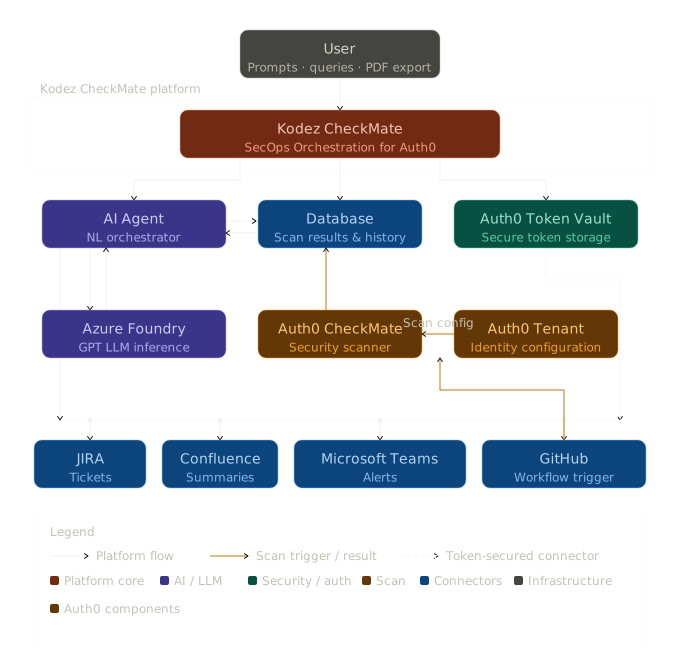
The diagram above illustrates how each component fits together. At the centre is the Kodez CheckMate platform, which coordinates the AI Agent, Database, and Auth0 Token Vault. The AI Agent delegates LLM inference to Azure Foundry GPT and drives the Auth0 CheckMate security scanner. The scanner receives its scan configuration directly from the Auth0 Tenant — the live identity environment being assessed — ensuring every scan reflects the actual state of your Auth0 configuration. Results are persisted to the database and surfaced through the downstream connectors: JIRA, Confluence, and Microsoft Teams. GitHub Workflow sits apart from these — its sole role is to trigger the Auth0 CheckMate security scanner, kicking off scans on demand or on a schedule.
Product Demo
How It Works
Log In with Auth0
Everything starts with your Auth0 account. Users authenticate directly through Auth0, so there is no separate credential to manage and no new identity silo to introduce into your stack.
Once logged in, you connect the integrations your team already uses: GitHub, JIRA, Confluence, and Microsoft Teams. The connection process is built on top of Auth0 Token Vault, which means the access tokens and refresh tokens issued by each integration are stored securely inside the vault, completely out of reach of the client application. Tokens are never exposed in transit, never held in your browser, and never accessible outside the vault environment. This is not just a security convenience — it is a meaningful reduction in token misuse risk and a genuine compliance improvement for teams operating under frameworks like SOC 2, ISO 27001, or similar.
Why We Built Auth0 Token Vault Into Kodez CheckMate From Day One
When we started building Kodez CheckMate, the hardest problem was not the AI Agent, the scan orchestration, or the JIRA integration. It was a question we kept coming back to: where do the tokens live?
CheckMate connects to GitHub, JIRA, Confluence, and Microsoft Teams on your behalf. That means OAuth access tokens, refresh tokens, and credentials with real write permissions. The naive path — storing them in a database, passing them through the app layer, caching them in the browser — felt wrong from the first whiteboard session. Not wrong in a theoretical way. Wrong in a this will cause an incident one day way.
We evaluated several approaches. Environment variables felt too brittle at scale. A secrets manager added operational overhead we did not want to impose on users. Then we looked harder at Auth0 Token Vault, and something clicked.
Connecting the Integrations: Out-of-the-Box, Enterprise, and OIDC
Before we even got to Token Vault, we had to solve a related challenge: Auth0 does not have a social connection for every service we needed. GitHub was straightforward — Auth0 ships with a GitHub connector out of the box. Microsoft Teams was also well-served: Auth0 provides a first-party Microsoft Azure AD Enterprise Connection, so we used that directly — no custom configuration required. JIRA and Confluence were a different story.
What made JIRA and Confluence tractable is that Auth0 supports any OIDC-compliant connection. Both Atlassian services expose an OIDC-compatible identity layer, so we registered them as custom social connections and Auth0 handled the rest — including the token lifecycle. No custom OAuth dance, no hand-rolled callback handlers. If Auth0 does not have a built-in connector for a service you need, the answer is straightforward: if it speaks OIDC, you can connect it.
Auth0's OIDC support means you are not limited to the services with first-party social or enterprise connections. Any OIDC-compliant provider can be brought into the same authentication and token management model — which is exactly how we integrated JIRA and Confluence. For Microsoft Teams, the out-of-the-box Azure AD Enterprise Connection made the setup even simpler.
Token Vault: Closing the Exposure Gap
That is where Token Vault came in. It keeps every credential inside the Auth0 infrastructure, completely isolated from the client application. The app never holds a token. The browser never sees one. When the AI Agent needs to create a JIRA ticket or post to Teams, it calls through the vault — the token is used, but never exposed. The attack surface for credential theft essentially collapses.
What surprised us was how naturally this composed with Auth0's existing session model. Users were already authenticating through Auth0 to access CheckMate. Managing integration credentials through the same trust boundary — OIDC connections feeding directly into Token Vault — felt like a coherent system, not a patchwork of loosely connected parts.
The compliance angle mattered too. Teams operating under SOC 2 or ISO 27001 need demonstrable controls around third-party credentials. Token Vault provided that story without adding any operational burden to customers. The architectural decision that took the most deliberation ended up being the one we would change least.
The AI Agent: GPT-5.4 on Azure
At the heart of the platform is an AI Agent powered by GPT-5.4, running on Azure Cloud. This is not a chatbot bolted onto a dashboard — it is the primary interface for the platform. You interact with it through natural language prompts, and it handles the orchestration behind the scenes.
The agent understands the context of the platform. When you type Run security scan, it recognises the intent, identifies the appropriate action — invoking Auth0 CheckMate against your target Auth0 tenant — and responds with a clear description of what it is about to do, asking you to confirm before proceeding. This human-in-the-loop approval step is a deliberate design choice: every action the agent takes requires explicit user sign-off, so nothing runs without your knowledge.
Prompt Templates for Faster Interaction
To speed up common workflows, the platform provides a set of pre-defined prompt templates directly in the agent chat. Rather than typing from scratch, users can pick a template — Run security scan, Compare with last scan, Create JIRA tickets for all findings, Publish Confluence summary, Alert team on Teams — and the agent is ready to act immediately.
Chain Multiple Tasks in a Single Prompt
One of the more powerful capabilities is task chaining. Instead of triggering actions one by one, you can combine multiple tasks into a single prompt:
Run security scan. Publish the executive summary into Confluence. Create JIRA tickets for issue tracking and update the stakeholders via Teams.
The agent parses that as four distinct actions, presents them to you for approval in sequence, and then executes each one in order — without you having to re-engage between steps.
Security Scans, Visualised
After a scan completes, the agent does not just return a wall of JSON. It processes the results and presents them visually — charts and graphs that show the number of open vulnerabilities per scan, so you can immediately see whether your security posture is improving, degrading, or holding steady over time.
You can also compare scans directly. Ask the agent How do today's results compare to last week's scan? and it will surface the delta: new findings, resolved issues, and anything that has changed.
From Findings to JIRA Tickets, Automatically
Once you have scan results, the next step is usually getting those findings into your project management workflow. With Kodez CheckMate, that is a single prompt:
Create a JIRA board and create tickets for all findings.
The agent connects to your linked JIRA account via the integration and creates structured tickets for every open vulnerability — no copy-pasting, no manual triage, and no context switching.
Executive Summaries in Confluence
Security findings do not just need to be actioned — they need to be documented. With one prompt, the agent can publish an executive summary of your scan results directly to a Confluence page. The content is structured and readable, giving leadership and audit teams the visibility they need without requiring engineers to write reports manually.
Real-Time Alerts in Microsoft Teams
Critical vulnerabilities should not wait for the next standup. When new issues are identified in your Auth0 tenant, you can prompt the agent to push alerts directly to a Microsoft Teams channel so your security and engineering teams get notified immediately with actionable context.
Enhanced PDF Reports
For teams that need formal documentation, Kodez CheckMate includes a PDF export capability that goes beyond the default Auth0 CheckMate report. The exported reports are structured for clarity with organised findings, severity breakdowns, remediation recommendations, and scan comparisons in a clean, professional format.
Why It Matters
The individual pieces here — security scanning, ticketing, documentation, and alerting — are not new. What is new is the orchestration layer that connects them, driven by a model that understands what you are trying to do and handles the coordination automatically.
For security teams, that means less time managing workflows and more time reducing risk. For engineering teams, it means findings arrive in their existing tools in the right format without manual handoff. For leadership, it means visibility into security posture without waiting for a weekly report.
Kodez CheckMate is available now. Log in with your Auth0 account to connect your integrations and run your first scan.
Kodez CheckMate — AI-Powered SecOps Orchestration for Auth0.